Work environments have evolved significantly as organizations recognize the importance of employee health, comfort, and productivity. One important development in modern workplaces is the use of office ergonomic furniture. These furniture solutions are designed to support natural body posture and reduce physical strain during daily tasks such as typing, writing, or working on a computer.
Many people spend long hours sitting at desks or using digital devices. Poor workstation design can contribute to discomfort, fatigue, and posture-related issues over time. Office ergonomic furniture aims to address these concerns by aligning furniture design with the natural movements and physical needs of the human body.
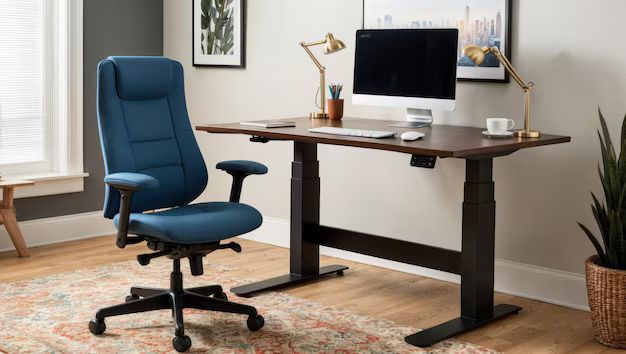
This article explains the concept of office ergonomic furniture, how it works, the different types available, and how it contributes to workplace comfort and efficiency.
Fundamental Concepts
Ergonomics is the scientific study of how people interact with their work environments, tools, and equipment. The goal of ergonomics is to design products and workspaces that support human capabilities while minimizing strain or injury.
Office ergonomic furniture refers to furniture specifically designed using ergonomic principles. These designs focus on supporting natural body alignment, improving posture, and allowing users to adjust furniture according to their individual needs.
Key concepts related to ergonomic furniture include:
- Posture support – maintaining proper alignment of the spine, neck, and shoulders
- Adjustability – the ability to modify height, angle, or position for comfort
- Neutral positioning – reducing unnecessary strain on joints and muscles
- Workstation alignment – positioning equipment in a way that supports efficient movement
Understanding these concepts helps explain why ergonomic furniture differs from traditional office furniture.
How It Works / Core Mechanism
Office ergonomic furniture works by supporting the body's natural structure and allowing adjustments that accommodate different users and tasks.
A typical ergonomic workstation functions through several coordinated elements:
1. Adjustable Seating
Ergonomic chairs often include adjustable seat height, lumbar support, armrests, and backrest angles. These adjustments allow users to maintain proper posture and reduce pressure on the spine.
2. Correct Desk Height
Desk height plays a critical role in ergonomic design. A desk positioned at the correct height helps maintain neutral wrist positioning while typing and prevents excessive shoulder strain.
3. Monitor Positioning
Screens positioned at eye level help reduce neck bending and eye strain. Proper monitor placement allows users to maintain a natural viewing angle while working.
4. Workspace Alignment
Ergonomic layouts organize frequently used items within easy reach. This minimizes repetitive stretching or twisting movements that can lead to discomfort.
By coordinating these elements, ergonomic furniture promotes comfort and efficiency throughout the workday.
Types or Categories
Office ergonomic furniture includes a variety of specialized furniture types designed to support different working positions and tasks.
Ergonomic Chairs
Ergonomic chairs are one of the most widely recognized forms of ergonomic furniture. These chairs support the natural curvature of the spine and provide adjustable features.
Common characteristics include:
- Adjustable seat height
- Lumbar support
- Adjustable armrests
- Flexible backrest angle
These features allow users to customize seating positions based on body proportions and personal comfort.
Sit-Stand Desks
Sit-stand desks allow users to alternate between sitting and standing positions throughout the day. This flexibility can help reduce prolonged sitting and encourage movement during work hours.
Many models include adjustable height mechanisms that allow smooth transitions between positions.
Ergonomic Keyboards and Input Supports
Workstations may include ergonomic accessories designed to improve typing posture and wrist alignment.
Examples include:
- Split keyboards
- Keyboard trays
- Wrist supports
- Adjustable mouse platforms
These tools help maintain neutral wrist positions and reduce repetitive strain.
Monitor Arms and Display Supports
Monitor arms allow screens to be repositioned easily in terms of height, distance, and viewing angle. This adaptability helps users maintain proper head and neck alignment.
Footrests and Posture Supports
Footrests support proper leg positioning, especially for individuals whose feet may not reach the floor comfortably when seated. These tools contribute to improved circulation and posture.
Key Components or Elements
Office ergonomic furniture incorporates several design elements that support comfort and flexibility.
Adjustability Mechanisms
Adjustable components allow users to modify furniture settings according to their body dimensions and working style.
Common adjustable features include:
- Seat height and depth
- Armrest height and width
- Backrest angle
- Desk height
These adjustments help create a more personalized workspace.
Supportive Materials
Materials used in ergonomic furniture often emphasize both comfort and durability.
Examples include:
- Breathable mesh fabrics for airflow
- Cushioned seat padding
- Reinforced structural frames
- Flexible support materials for backrests
Material selection contributes to long-term comfort during extended use.
Mobility and Flexibility
Some ergonomic furniture designs incorporate wheels, swivel mechanisms, or modular components. These features allow users to move freely within the workspace without excessive strain.
Stability and Structural Design
Proper structural design ensures that ergonomic furniture remains stable while supporting various adjustments and movements.
Applications and Real-World Uses
Office ergonomic furniture is used in many types of work environments. As digital work and computer-based tasks have increased, ergonomic considerations have become relevant across multiple industries.
Common environments where ergonomic furniture is applied include:
- Corporate offices
- Educational institutions
- Remote workspaces and home offices
- Technology and research environments
- Administrative departments
In each of these settings, ergonomic furniture helps create workspaces that support comfort and task efficiency.
Benefits and Practical Advantages
Ergonomic furniture provides several practical benefits related to workplace comfort and productivity.
Improved Posture
Furniture designed with ergonomic principles supports natural body alignment. Proper posture helps reduce unnecessary pressure on the spine and joints.
Reduced Physical Strain
Adjustable seating and workstation components help distribute body weight more evenly and reduce strain on muscles and joints.
Increased Comfort During Long Work Sessions
Many modern work tasks require extended periods of computer use. Ergonomic furniture helps make these long sessions more comfortable.
Enhanced Workspace Adaptability
Adjustable furniture can accommodate individuals with different body sizes and work preferences.
Better Workspace Organization
Ergonomic workstation layouts help position tools and equipment efficiently, reducing repetitive reaching or awkward movements.
Challenges or Limitations
Despite its benefits, ergonomic furniture may present certain challenges or limitations.
Individual Differences
Human bodies vary widely in size, shape, and comfort preferences. A single furniture configuration may not suit every user equally.
Learning Curve
Users may require time to understand how to adjust ergonomic furniture properly. Incorrect adjustments may reduce its intended benefits.
Workspace Constraints
Some offices may have limited space, which can make it difficult to incorporate larger ergonomic furniture items such as adjustable desks.
Maintenance and Durability Considerations
Furniture with adjustable mechanisms may require occasional maintenance to ensure smooth operation over time.
Best Practices and Useful Insights
Understanding how to evaluate and use ergonomic furniture can help individuals create more comfortable work environments.
Helpful practices include:
- Adjust chair height so feet rest flat on the floor
- Position monitors at or slightly below eye level
- Keep frequently used tools within comfortable reach
- Maintain a neutral wrist position while typing
- Alternate between sitting and standing when possible
Regular movement and posture awareness also contribute to overall comfort during work activities.
Future Trends or Developments
Ergonomic furniture design continues to evolve as workplace technologies and work habits change.
Several emerging trends include:
Smart Ergonomic Furniture
Some modern furniture designs incorporate sensors that track posture and movement patterns. These systems may provide feedback to encourage healthier work habits.
Flexible Workstation Designs
Workspaces are increasingly designed to support multiple work styles, including collaborative areas, standing stations, and adaptable desks.
Sustainable Materials
Furniture manufacturers are exploring environmentally responsible materials and production processes.
Integration with Digital Work Environments
Future ergonomic systems may integrate more closely with digital tools and workplace technologies to support personalized workspace adjustments.
Conclusion
Office ergonomic furniture plays an important role in modern work environments by supporting comfort, posture, and efficient workspace organization. Designed around ergonomic principles, these furniture solutions aim to align workplace equipment with the natural structure and movement of the human body.
By incorporating adjustable seating, flexible workstations, and supportive materials, ergonomic furniture helps create environments that accommodate a wide range of users and tasks. Although proper adjustment and workspace planning are necessary to maximize benefits, ergonomic design continues to influence how offices are structured and how people interact with their workspaces.
As workplaces continue to evolve, ergonomic furniture is likely to remain an important part of creating comfortable and adaptable work environments.