Gaming Chair & Desk Systems Guide for Ergonomic Setup and Performance Insights
Gaming chair and desk systems are integrated furniture setups designed to support long hours of computer use, competitive gaming, content creation, and remote work. These systems combine ergonomic seating with desks structured for monitors, keyboards, and accessories.
The concept of gaming chair and desk systems emerged as gaming evolved from casual entertainment to esports, streaming, and professional digital work. As screen time increased, users sought structured workstations to reduce physical strain while improving focus and performance.
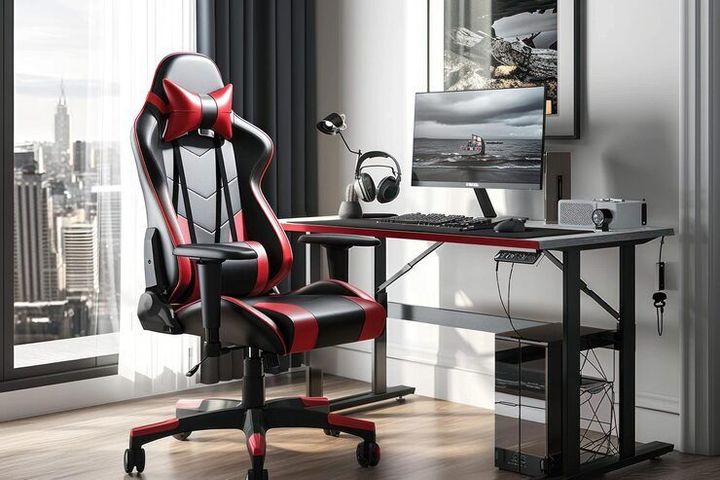
A gaming chair typically features adjustable lumbar support, headrests, reclining functions, and armrest positioning. Gaming desks often include cable management, height adjustment, monitor stands, and surfaces suitable for multiple displays. Together, these systems create a stable, comfortable, and organized environment for extended sessions.
Importance of Gaming Chair & Desk Systems
Digital lifestyles have expanded rapidly, with online education, hybrid work, competitive esports, and content creation making ergonomic setups more important than ever.
Extended sitting without support can lead to:
- Lower back discomfort
- Neck strain
- Poor posture habits
- Reduced productivity
- Fatigue during long sessions
Gaming chair and desk systems promote neutral spine alignment, adjustable positioning, and long-term comfort. They benefit multiple groups:
- Students attending virtual classes
- Remote professionals
- Streamers and content creators
- Competitive gamers
- Software developers and designers
In India, growing digital adoption in urban centers is increasing awareness about ergonomic home and office setups. Proper systems improve concentration, reduce musculoskeletal stress, and support long-term usability.
Key Components and Ergonomic Factors
Feature Comparison
| Feature | Gaming Chair | Standard Office Chair | Gaming Desk |
|---|---|---|---|
| Lumbar Support | Adjustable | Fixed or minimal | Not applicable |
| Armrests | 2D/3D/4D adjustable | Basic | Not applicable |
| Recline Angle | 135–180° | 100–120° | Not applicable |
| Height Adjustment | Gas lift system | Gas lift system | Manual or electric |
| Cable Management | No | No | Yes |
| Monitor Support | No | No | Often included |
Important Ergonomic Guidelines
- Seat height aligned with knees at 90 degrees
- Elbows positioned at desk height
- Monitor at eye level
- Feet flat on the floor or footrest
These fundamentals apply regardless of brand or style.
Recent Updates and Industry Trends (2025)
Rise of Smart Desks
Height-adjustable electric desks with memory presets are gaining popularity. Users can alternate between sitting and standing positions, supporting healthier work cycles.
Sustainable Materials
Manufacturers increasingly use recycled metal frames and eco-friendly foam materials in response to sustainability goals.
Esports Growth in India
The Indian esports ecosystem is expanding, with structured gaming setups becoming common among competitive players.
Hybrid Work Influence
Professionals are adopting gaming chairs for work-from-home setups due to enhanced adjustability.
Improved Safety Certifications
Products now emphasize compliance with international safety standards for gas lifts and structural stability.
Laws and Policies Affecting Gaming Chair & Desk Systems
Gaming chairs and desks, as consumer products, are influenced by broader safety and regulatory frameworks.
Key Guidelines in India
- Bureau of Indian Standards (BIS) safety guidelines for furniture
- Import regulations on product quality and labeling
- Environmental regulations for materials and manufacturing
Workplace ergonomics standards, while mostly applying to offices, indirectly influence product design.
Global Considerations
- U.S. and European workplace safety frameworks encourage ergonomic furniture usage
- Consumers should check stability certifications, weight capacity, and material safety compliance
These standards reduce mechanical failure risks and ensure durability.
Tools and Resources for Setup Planning
Ergonomic Assessment
- Occupational Safety and Health Administration (OSHA) guidance
- World Health Organization (WHO) workplace ergonomics resources
Room Planning
- 3D layout planners (IKEA)
- Design visualization tools (SketchUp)
Additional Tools
- Desk height calculators
- Cable management templates
- Posture reminder apps
Basic Setup Guide
| User Height | Recommended Desk Height | Chair Height Range |
|---|---|---|
| 5’0”–5’4” | 60–65 cm | 38–45 cm |
| 5’5”–5’9” | 65–70 cm | 42–50 cm |
| 5’10”–6’2” | 70–75 cm | 45–53 cm |
Additional tips:
- Keep wrists neutral while typing
- Avoid leaning forward for long periods
- Position monitors 20–30 inches from eyes
- Ensure adequate lighting to reduce eye strain
Frequently Asked Questions
What is the main difference between a gaming chair and an office chair?
Gaming chairs offer extended recline, adjustable armrests, and racing-style support. Office chairs focus on aesthetics and moderate adjustability.
Are gaming desks suitable for professional work?
Yes. They provide structured cable management and stable surfaces for remote work.
How long should someone sit before taking a break?
Standing or stretching every 30–60 minutes is recommended to reduce strain.
Do gaming chairs improve posture automatically?
No. Proper adjustment and mindful sitting habits are essential.
Are standing desks better than seated desks?
Alternating between sitting and standing positions is beneficial. Adjustable desks support this flexibility.
Considerations Before Choosing a Setup
When evaluating systems, consider:
- Room dimensions
- Weight capacity requirements
- Material durability
- Ventilation and cushioning
- Cable management needs
- Multi-monitor compatibility
Proper consideration ensures better long-term usability.
Productivity and Performance Insights
Structured seating and correct desk height can:
- Improve concentration
- Reduce fatigue
- Support better typing efficiency
- Lower risk of repetitive strain injuries
For competitive gamers, posture stability also supports consistent hand positioning and reaction accuracy.
Conclusion
Gaming chair and desk systems provide ergonomic solutions for long hours of screen-based activity. By combining adjustable seating and functional desk design, they promote comfort, posture stability, and organization.
With growing digital engagement, hybrid work, and esports, these systems are increasingly part of modern home environments. Correct adjustment and healthy habits ensure improved comfort, usability, and long-term ergonomic benefits.