Smart Adjustable Desks Explained: Features, Ergonomics and Technology
Smart adjustable desks combine height-adjustable work surfaces with electronic controls and intelligent features.
They help users switch between sitting and standing positions throughout the day. Many models also include memory settings, reminders, sensors, and connected controls.
These desks are increasingly used in offices and home workspaces. Their main purpose is to improve workstation flexibility. Proper adjustment can also support more neutral working postures.
Quick Answer: What Are Smart Adjustable Desks?
- Smart adjustable desks electronically change their working height.
- Electric motors typically control the lifting mechanism.
- Memory presets can store preferred sitting and standing heights.
- Some desks provide movement or posture reminders.
- Sensors may detect obstacles during height adjustment.
- Connected models can include app-based controls and usage tracking.
- Proper desk setup can support workplace ergonomics and comfort.
- Smart features vary significantly between desk designs.
What Is a Smart Adjustable Desk?
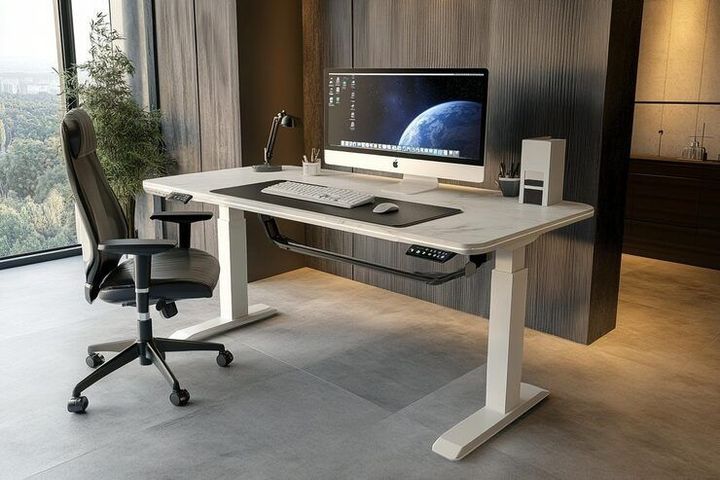
A smart adjustable desk is an electronically controlled workstation. Its height can change to support different working positions.
The "smart" element usually refers to additional digital functions. These may include programmable controls, reminders, sensors, and connectivity features.
A typical system combines:
- Adjustable desktop
- Electric lifting columns
- Motor system
- Electronic control unit
- Control keypad
- Height display
- Memory functions
- Safety sensors
Advanced models may include additional workplace technology.
How Do Smart Adjustable Desks Work?
Most smart adjustable desks use an electric lifting system. Motors move telescoping columns within the desk frame.
The process generally follows several steps.
How Does the Height Adjustment Process Work?
When the user presses a control, an electronic signal reaches the control unit.
The system then:
- Activates the electric motors.
- Moves the lifting columns.
- Raises or lowers the desktop.
- Monitors movement and height.
- Stops at the selected position.
Some systems automatically stop at stored height settings.
What Components Are Inside a Smart Adjustable Desk?
Several mechanical and electronic components work together.
What Does the Electric Motor Do?
The electric motor powers vertical movement.
Some desks use one motor. Larger systems may use dual-motor configurations.
Multiple motors can help synchronize lifting columns.
What Are Telescoping Lifting Columns?
Lifting columns form the adjustable sections of the desk legs.
They extend and retract during height changes.
Their design affects:
- Adjustment range
- Stability
- Movement smoothness
- Load handling
- Desk alignment
What Does the Control Box Do?
The control box coordinates electronic operation.
It communicates with motors, sensors, and the control panel.
The controller may also manage:
- Height memory
- Motor synchronization
- Safety functions
- Movement limits
- Error detection
How Does the Control Panel Work?
The control panel provides the main user interface.
Basic panels use simple up-and-down buttons.
Advanced controls may include:
- Digital height displays
- Memory buttons
- Reminder controls
- Lock functions
- USB connectivity
- Touch-sensitive controls
What Smart Features Can Adjustable Desks Include?
Smart desks can include features beyond basic height adjustment.
How Do Memory Height Presets Work?
Memory presets store selected desk heights.
Users can save different positions for sitting and standing.
This reduces repeated manual adjustment.
What Are Sitting and Standing Reminders?
Some desks include programmable movement reminders.
These reminders encourage users to change working positions periodically.
Alerts may appear through:
- Control panel notifications
- Indicator lights
- Audible signals
- Connected applications
How Does Anti-Collision Detection Work?
Anti-collision technology detects resistance during desk movement.
The system may stop or reverse movement after detecting an obstruction.
This feature helps protect nearby objects and desk components.
Can Smart Desks Connect With Mobile Applications?
Some connected desks support mobile applications.
Depending on the system, applications may provide:
- Height controls
- Movement reminders
- Usage history
- Saved positions
- Activity tracking
- Personal workstation profiles
Available functions depend on the desk's electronic architecture.
How Can Adjustable Desks Support Ergonomics?
Ergonomics focuses on fitting the workstation to the user.
A height-adjustable desk provides more flexibility than a fixed workstation.
Proper adjustment may help users maintain:
- Neutral wrist positioning
- Comfortable elbow angles
- Appropriate monitor height
- Balanced standing posture
- Suitable seated posture
However, desk height alone does not create an ergonomic workstation.
Chair position, monitor placement, keyboard height, and movement habits also matter.
How Should a Smart Desk Be Adjusted for Sitting?
Start with the chair before adjusting the desk.
The feet should rest comfortably on the floor or foot support.
Then adjust the desk so:
- Elbows remain near the body's sides.
- Forearms stay approximately parallel to the floor.
- Wrists remain relatively straight.
- Shoulders stay relaxed.
- The monitor remains at a comfortable viewing level.
Small adjustments may be necessary for individual body proportions.
How Should a Smart Desk Be Adjusted for Standing?
Standing desk height should support a relaxed upper-body posture.
The keyboard should remain around comfortable elbow height.
During standing:
- Keep shoulders relaxed.
- Avoid excessive wrist bending.
- Keep the screen directly ahead.
- Maintain comfortable viewing distance.
- Change position periodically.
- Avoid remaining completely static.
Movement remains important during both sitting and standing.
Is Standing All Day Better Than Sitting?
Standing continuously is not the main goal.
The purpose of an adjustable workstation is postural variation.
Alternating positions may reduce prolonged static posture.
Useful workplace habits include:
- Changing positions periodically
- Taking short walking breaks
- Stretching occasionally
- Adjusting posture throughout the day
- Avoiding prolonged uninterrupted sitting
- Avoiding prolonged uninterrupted standing
A balanced approach supports workstation flexibility.
What Is the Difference Between Manual and Smart Adjustable Desks?
Manual adjustable desks rely on mechanical controls.
They may use hand cranks or other mechanisms.
Smart electric desks use powered adjustment and electronic controls.
Smart systems may also provide:
- Programmable positions
- Digital height displays
- Movement reminders
- Safety detection
- Usage tracking
- Connected controls
The exact feature set depends on the system design.
What Types of Smart Adjustable Desks Are Common?
Different configurations support different environments.
What Are Single-Motor Adjustable Desks?
Single-motor systems use one motor for height movement.
Mechanical components distribute movement across the frame.
What Are Dual-Motor Adjustable Desks?
Dual-motor systems commonly use separate motors for different lifting columns.
Electronic controls synchronize their movement.
What Are L-Shaped Adjustable Desks?
L-shaped desks provide a larger working surface.
Their lifting systems may use several synchronized columns.
What Are Compact Smart Desks?
Compact designs focus on smaller workspaces.
They may combine electronic adjustment with space-efficient frames.
What Should Be Considered When Setting Up an Adjustable Desk?
A good setup considers more than height.
Important factors include:
- Desk stability
- Adjustment range
- Desktop dimensions
- Monitor positioning
- Keyboard placement
- Cable management
- Electrical access
- Equipment arrangement
- Available movement space
Heavy equipment should also be distributed appropriately.
Why Is Cable Management Important?
Height-adjustable desks move vertically.
Cables must have enough flexibility for the full movement range.
Poor cable management may create:
- Tension on connectors
- Tangled cables
- Restricted desk movement
- Equipment instability
Cable routing should be checked at both minimum and maximum desk heights.
How Can Smart Adjustable Desks Be Maintained?
Routine care can support reliable operation.
Useful practices include:
- Keep lifting columns clean.
- Inspect cables periodically.
- Check electrical connections.
- Keep obstacles away from moving parts.
- Monitor unusual motor sounds.
- Verify that the desk remains level.
- Follow manufacturer reset procedures when required.
Avoid placing unnecessary stress on moving components.
What Technologies Are Shaping Smart Adjustable Desks?
Smart workstation technology continues to develop.
Emerging features include:
- Occupancy sensing
- Automated height adjustment
- Posture reminders
- Usage analytics
- Wireless connectivity
- Device charging integration
- Personal workstation profiles
- Environmental sensors
- Workspace automation
- Energy management functions
Future systems may provide greater personalization and workplace integration.
How Are Smart Desks Used in Modern Workspaces?
Smart adjustable desks can support flexible workstation designs.
They appear in:
- Corporate offices
- Home offices
- Shared workspaces
- Educational environments
- Design studios
- Technical workstations
- Research environments
Their flexibility makes them suitable for varied working patterns.
Frequently Asked Questions
What makes an adjustable desk "smart"?
Smart desks add electronic functions beyond basic height adjustment. These may include memory controls, sensors, reminders, and connectivity.
Do smart adjustable desks need electricity?
Most motorized models require electrical power. Electronic features also depend on a power source.
What is desk height memory?
Height memory stores preferred desk positions. Users can return to those settings using programmed controls.
What is anti-collision technology?
Anti-collision technology detects resistance during movement. The desk may stop or reverse after detecting an obstruction.
Can multiple people use the same adjustable desk?
Yes. Programmable presets can help different users restore their preferred workstation heights.
Are smart adjustable desks only designed for standing?
No. They are designed to support both sitting and standing positions. Their main advantage is workstation adjustability.
Key Takeaways
Smart Adjustable Desks Summary
- Smart adjustable desks combine motorized movement with electronic controls.
- Electric motors raise and lower the work surface.
- Memory presets store preferred workstation heights.
- Smart features may include reminders, sensors, and connected controls.
- Anti-collision detection can improve movement safety.
- Proper adjustment can support more neutral working positions.
- Sitting and standing should be combined with regular movement.
- Monitor, keyboard, and chair positioning remain important.
- Cable management should accommodate the desk's full movement range.
- Smart workstation technology continues to become more connected.